O&O EventViewer
The O&O EventViewer enables analysis of Windows event logs from both currently detected systems and imported log files. This provides an essential diagnostic tool for identifying the causes of startup problems, system crashes, or faulty services.
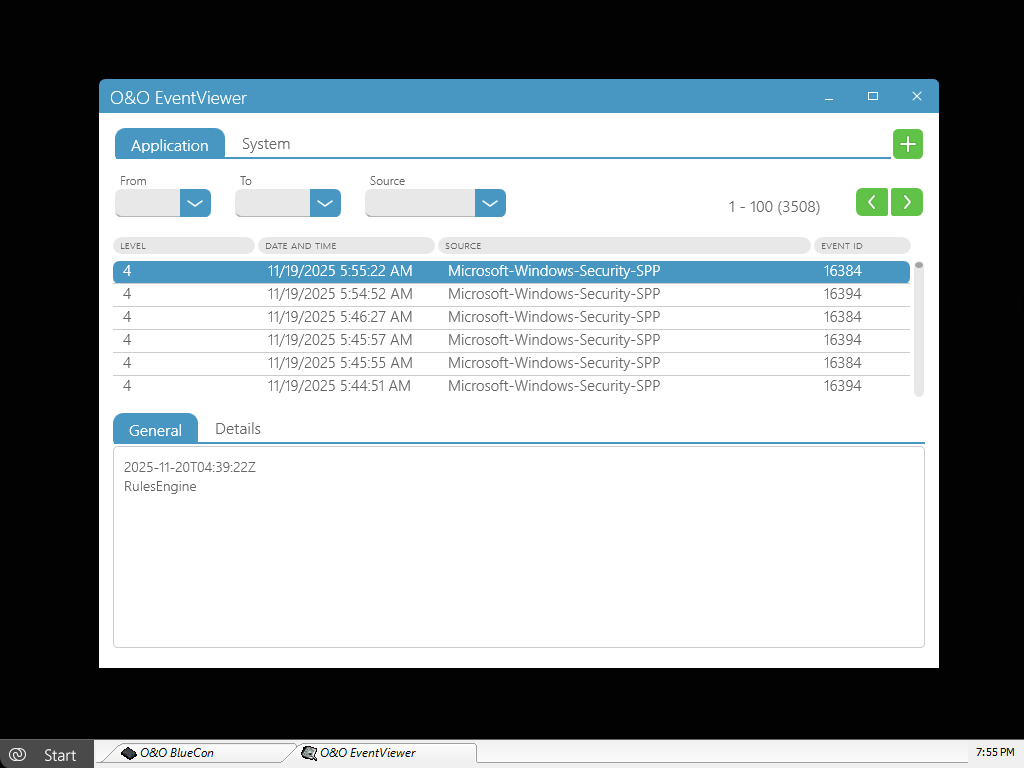
Viewing and Filtering Event Logs
In the upper section of O&O EventViewer, you can switch between the following event logs:
- System
- Applications
For targeted analysis, the displayed events can be filtered using the buttons above the table, for example by:
- date and time range
- event source
- event type
Navigation buttons next to the filter options allow you to browse through the event log page by page.
Detailed View of Events
To display detailed information about an event entry, click the corresponding row in the table.
In the lower section of the window, you can switch between two views:
- General – a clear summary of the event
- Details – technical information for in-depth analysis
This information is particularly helpful for clearly identifying faulty drivers, services, or applications.
Importing Event Logs
In addition to analyzing local event logs, external event logs can also be imported.
To import an event log:
- Click the plus icon in the upper-right corner.
- Select an event log file with the
.evtxextension. - Load the file into O&O EventViewer for analysis.
This function is particularly suitable for:
- analyzing logs from backups
- examining systems that are no longer bootable
- forensic or retrospective error analysis
Typical Use Cases
- Analysis of blue screens and system crashes
- Troubleshooting non-bootable Windows systems
- Identification of faulty drivers or services
- Evaluation of imported event logs from backups