O&O RegEditor
The O&O RegEditor is modeled on the familiar Windows Registry Editor in both structure and operation and provides full access to the Windows registry database. This database stores all settings for Windows, installed applications, drivers, and services.
A special feature of the O&O RegEditor is direct navigation via the address bar, which allows quick and precise access to specific registry keys. This is particularly useful for troubleshooting and repairing offline and emergency systems.
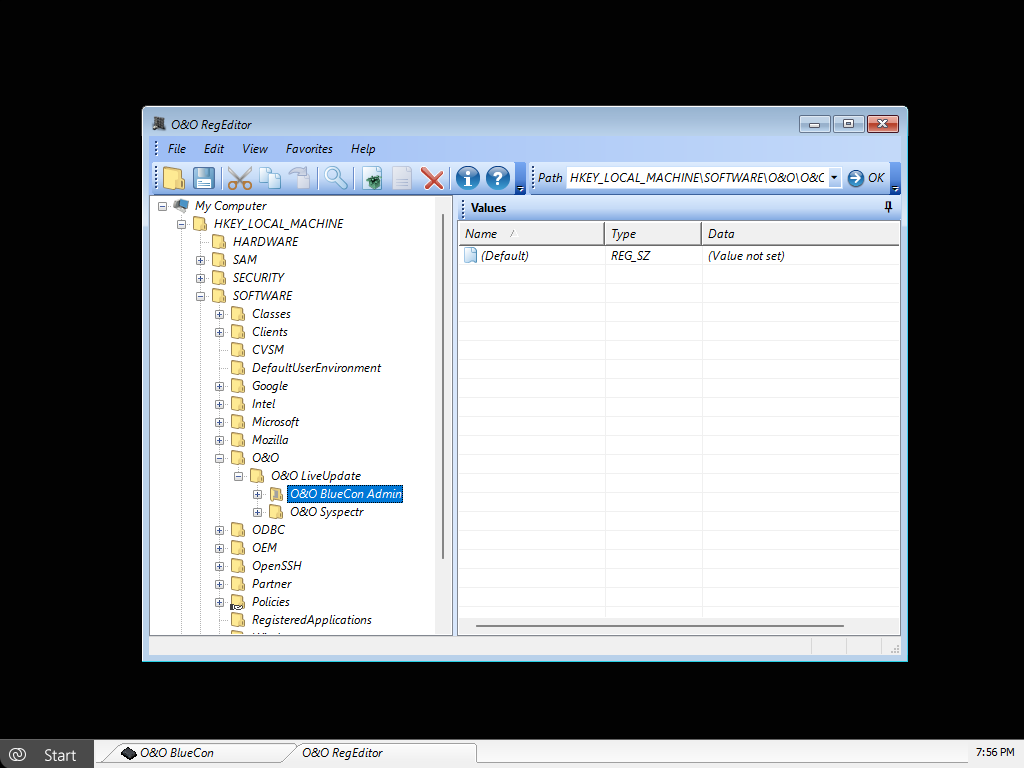
To open O&O RegEditor, click Start / Programs / Administration / O&O RegEditor.
Improper use of O&O RegEditor can cause serious problems affecting the entire system and may require a complete reinstallation of the operating system.
Before making any changes to the Windows registry, create a full backup of your data, for example using O&O DiskImage. O&O cannot guarantee that problems caused by incorrect use of O&O RegEditor can be resolved.
The stability and functionality of a Windows system depend heavily on the information stored in the registry database. Incorrect or corrupted entries can lead to a complete system failure.
With O&O RegEditor, the registry database of a maintenance system can be read and edited even if the installed Windows system is no longer bootable.
Navigation is performed—just as in Windows—via a tree structure in the left pane. The following two main branches are available:
HKEY_LOCAL_MACHINE– contains system-specific settingsHKEY_USERS– contains user-specific settings for all user profiles
The Windows shortcut key HKEY_CURRENT_USER does not exist because no user is currently logged on. The corresponding entries can be found under: HKEY_USERS\<username>.
The shortcut key HKEY_CLASSES_ROOT does not exist directly, but can be accessed via HKEY_LOCAL_MACHINE\SOFTWARE\CLASSES or through the corresponding subkeys under HKEY_USERS.
The key HKEY_LOCAL_MACHINE\SYSTEM\CurrentControlSet does not exist because no active ControlSet is loaded. Instead, multiple ControlSets are available, such as HKEY_LOCAL_MACHINE\SYSTEM\ControlSet001 and HKEY_LOCAL_MACHINE\SYSTEM\ControlSet002.
The currently used ControlSet is indicated under HKEY_LOCAL_MACHINE\SYSTEM\Select\Current. Typically, this is ControlSet001.
The shortcut key HKEY_CURRENT_CONFIG can be accessed via HKEY_LOCAL_MACHINE\SYSTEM\ControlSetXXX\Hardware Profiles\Current, where XXX represents the active ControlSet.
A key corresponds to a folder, while a value represents a setting within that key. Each key can contain one or more values.
O&O RegEditor supports all registry data types commonly used in Windows:
- REG_SZ – string
- REG_DWORD – 32-bit value
- REG_QWORD – 64-bit value
- REG_MULTI_SZ – multiple strings
- REG_EXPAND_SZ – expandable string (including environment variables)
- REG_BINARY – binary data
Numeric values can be entered in hexadecimal, decimal, or binary format.
To search the registry database, click Search in the toolbar, enter the desired key, value, or data content, and enable the appropriate search options.
New keys can be created via the context menu of an existing key. New values can also be added via the context menu, selecting the desired data type.
Values can be edited by double-clicking them or via the context menu, and deleted if required.
To manage permissions, select the desired key and choose Edit / Permissions. You can assign Full Control, Read permissions, or advanced permissions to users or groups. Permissions can optionally be inherited by subkeys.
Before making changes, it is recommended to export the affected key. Using File / Export, the key can be saved as a *.reg file. These files are fully compatible with the Windows Registry Editor and can later be re-imported using File / Import.