Defragmentation methods
In addition to the five methods for Zone filing, O&O Defrag continues to offer its seven methods for defragmenting your computer.
- STEALTH
- SPACE
- COMPLETE/Name
- COMPLETE/Modified
- COMPLETE/Access
- SOLID/Complete
- SOLID/Quick
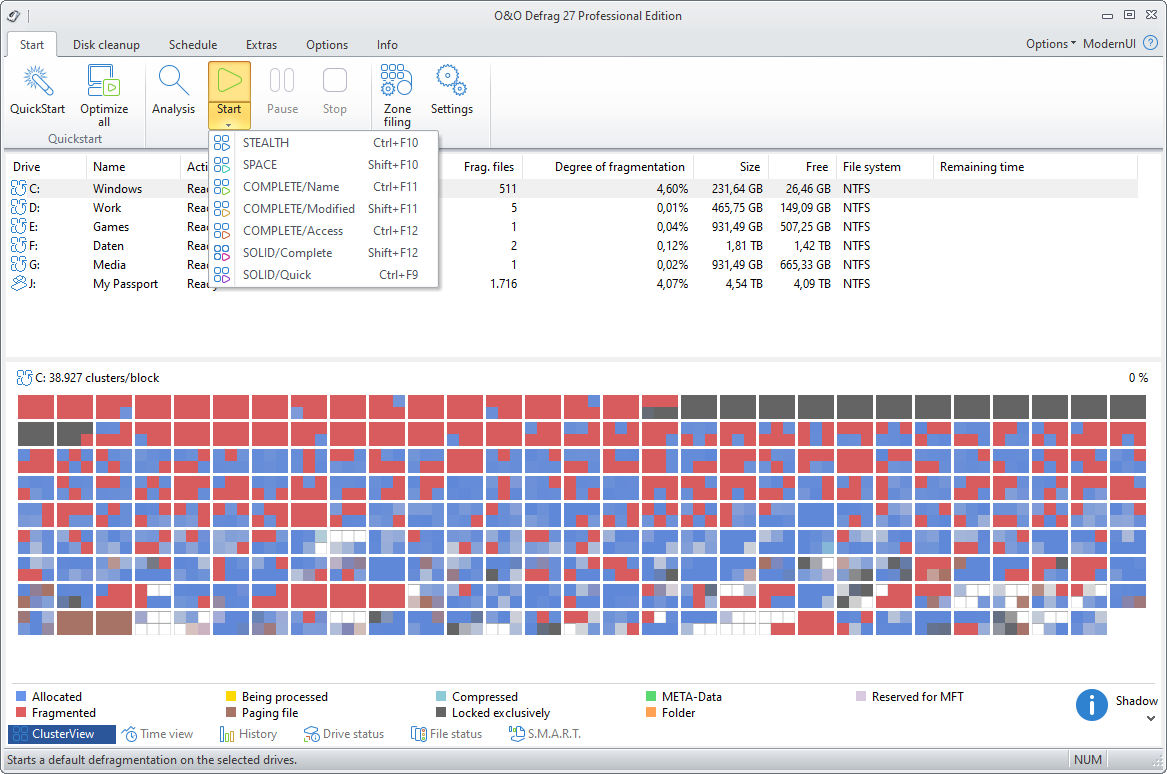
Please bear in mind that the older methods can only be selected if zone filing is disabled.
Performance standard methods of O&O Defrag
| SOLID/Complete | SOLID/Quick | SPACE | STEALTH | COMPLETE-Methods | |
|---|---|---|---|---|---|
| Defragmentation of files | + + | + + | + | + + | |
| Defragmenting the free space | + + | + + | + + | ||
| Prevention of further fragmentation | + + | + + | + | ||
| Results of high-level fragmentation* | + + | + | + | ||
| Suitability for very large files (> 4 GB) | + + | + | |||
| Suitability for many files (> 1 M) | + + | + | + + | ||
| Run time of first defragmentation** | + + | + | + + | ||
| Run time of recurring defragmentation | + + | + | + + | ||
| Required RAM | + + | + + | + | + + | |
| CPU Load | + + | + + | + | + + | |
| HDD | + | + + | + + | ||
| SSD | + + | + + |
| + | Very Applicable (with runtime: quick) |
|---|---|
| + + | Extremely Applicable (with runtime: very quick) |
* Our understanding of high-level fragmentation is a poorly maintained drive containing a large number of heavily fragmented files with little free space available.
** The run time of the first defragmentation lasts longer than with the previous version as a result of data being divided into zones.
COMPLETE/Access
The COMPLETE/Access method defragments your files and reorganizes your file structure. Although this method is slower than the STEALTH and SPACE methods, it guarantees maximum system performance when your files are being read.
Algorithm
Files are sorted according to when they were last accessed. The files that have been accessed the least will be placed at the beginning of the partition and those accessed most frequently are put near the end. Seldom-used files are defragmented and will not need to be moved in future. Frequently-used files are placed at the end of the drive. This strategy means that future defragmentation runs will require the least amount of time, as fewer files need to be checked and defragmented.
Recommended Application
If you want to use the COMPLETE/Modified method for your regular defragmentation runs, you should bear in mind that you only use this method on your drive. Combining various methods (COMPLETE, STEALTH, and SPACE) can result in defragmentation taking much longer, as the file system would need to be reorganized each time.
- Maximizes the read access performance on servers
- For regularly defragmenting your volumes
- On computers that have sufficient resources available when the defragmentation takes place – CPU usage is likely to increase significantly (it is strongly recommended that you use the O&O ActivityMonitor). A larger amount of free disk space is necessary with this method.
- All kinds of servers and workstations
COMPLETE/Modified
The COMPLETE/Modified method defragments your files and also reorganizes your file structure. Although this method is slower than the STEALTH and SPACE methods, it guarantees maximum system performance when your files are being read.
The COMPLETE method is particularly suitable for databases and file servers. It is important to bear in mind that this method requires quite a lot of main memory due to file reorganization. If this is likely to be a serious problem for your system, we recommend you use the STEALTH or SPACE methods.
Algorithm
Files are sorted according to the date on which they were last changed. The files which have not been changed recently are placed at the beginning of the partition and those recently changed are placed at the end. This option is a good one for file or database servers containing files that have never been changed (e.g. system files), but where others, on account of their size or content, are frequently modified. (e.g., database files)
This strategy means that future defragmentation will require the least amount of time, as only a few files need to be checked and defragmented.
Recommended Application
If you want to use the COMPLETE/Modified method for your regular defragmentation runs, you should bear in mind that you only use this method on your drive. Combining various methods (COMPLETE, STEALTH, and SPACE) can result in defragmentation taking much longer, as the file system would need to be reorganized each time.
- Maximizes the performance for write access on servers
- For regularly defragmenting your volumes
- On computers that have sufficient resources available when the defragmentation takes place – CPU usage is likely to increase significantly (it is strongly recommended that you use the O&O ActivityMonitor). A larger amount of free disk space is necessary with this method.
COMPLETE/Name
The COMPLETE/Name method defragments your files and also reorganizes your file structure. Although this method is slower than the STEALTH and SPACE methods, it guarantees maximum system performance when your files are being read.
The COMPLETE/Name method is particularly suitable for system drives. It is important to bear in mind that this method requires quite a lot of main memory due to file reorganization. If this is likely to be a serious problem for your system, we recommend you use the STEALTH or SPACE methods.
Algorithm
Files are sorted alphabetically from the beginning to the end of the partition and this leads to quick access to files in a directory. When Windows starts up, many system files will be read in sequence from the WINDOWS and the WINDOWSsystem32 directories (DLLs, system drives, etc.) and the start-up time will therefore be shorter.
This method is particularly recommended for computers on which the files rarely change. This reduces the reorganization time that is needed for every defragmentation.
Recommended Application
Please bear in mind that if you use the COMPLETE/Name method for your regular defragmentation runs, it should be the only one used on the drive. Combining various methods (COMPLETE, STEALTH, and SPACE) can result in defragmentation taking much longer, as the file system would need to be reorganized each time.
- Maximizes the performance for the read access to workstations
- For regularly defragmenting your volumes
- On computers that have sufficient resources available when the defragmentation takes place – CPU usage is likely to increase significantly (it is strongly recommended that you use the O&O ActivityMonitor). A larger amount of free disk space is necessary with this method.
- All kinds of servers and workstations
SOLID/Complete
As a result of SOLID/Complete, fragments are first combined and then a second run is started which closes any gaps. The easiest and fastest way is of course to combine the fragments and possibly even reduce their number. Access will then be faster and the number of memory cells used will be reduced. If there are now many gaps between data, these will be filled with new data in the future, which then must be fragmented because there isn’t not enough space available for the entire file.
Upon completion of successful defragmentation, SOLID/Quick will also be run on SSDs to guarantee that the space gained and freed cells are used optimally. The result is an immediate improvement of performance and preservation of resources in the future.
SOLID/Quick
SSDs manage their own memory intelligently and by doing so try to prevent losing speed as a result of fragmentation or ineffective data distribution. And up to a certain point this is also enough.
After intensive or prolonged use, however, it’s necessary to clean up internal optimization to regain its benefits. SSDs offer board resources for this purpose. SOLID/Quick uses these board resources in combination with a straightening up mechanism to improve future performance and resource allocation. It’s advisable to run SOLID/Quick regularly on an SSD because this is the only way for the SSD to achieve 100% of its performance continuously.
SPACE
The SPACE methods offer you a great solution for heavy fragmentation. It also allows you to consolidate your data so that the amount of contiguous free space is as large as possible and further fragmentation is prevented.
Algorithm
All fragmented files will be defragmented, and then placed into the free slots in which they fit. This maximizes contiguous free space. This method is very quick and efficient and it does reorganize your volume, but not as thoroughly as the COMPLETE methods.
Recommended Application
The SPACE method is ideal for the first defragmentation run on a system that has never been defragmented, as it requires far less free space than the COMPLETE methods. SPACE can also be used for regular defragmentation runs.
- Initial defragmentation of your system
- Computers with few available resources, as the method does not greatly increase the CPU usage and does not require much free hard disk space
- Servers with large hard disks (e.g. more than 1 terabyte)
- Computers with a large number of files (more than 100,000 files)
STEALTH
The STEALTH method differs from other methods in that it is much faster and uses much less main memory for the defragmentation.
Algorithm
The STEALTH method is based on our unique STEALTH technology and allows an unprecedented level of defragmentation on computers having a large number of files, little free space or available main memory.
This method defragments all fragmented files and tries to consolidate them in order to optimize available free disk space. Speed and resource usage are the main considerations here, and the method is therefore not quite as thorough as the SPACE and COMPLETE methods.
Recommended Application
The STEALTH method is especially useful for defragmentation on a regular basis.
- Initial defragmentation of your system
- Computers with few available resources, as the method does not greatly increase the CPU usage and does not require much free hard disk space
- Servers with very large hard disks (e.g. more than 4 terabytes)
- Computers with a very large number of files (more than 3,000,000 files)