Automatic optimization
Automatic optimization lets the Defrag agent maintain drives in the background. Use it for ongoing maintenance without a fixed start time. Use a job when you need a named task, specified drives, a fixed schedule, or different run conditions.
Enable background maintenance
- Open Automatic optimization.
- Enable Schedule automatic optimization.
- Set Perform quick method and Carry out a thorough method.
- Review the separate SSD maintenance controls.
- Check the dashboard's automatic-optimization status.
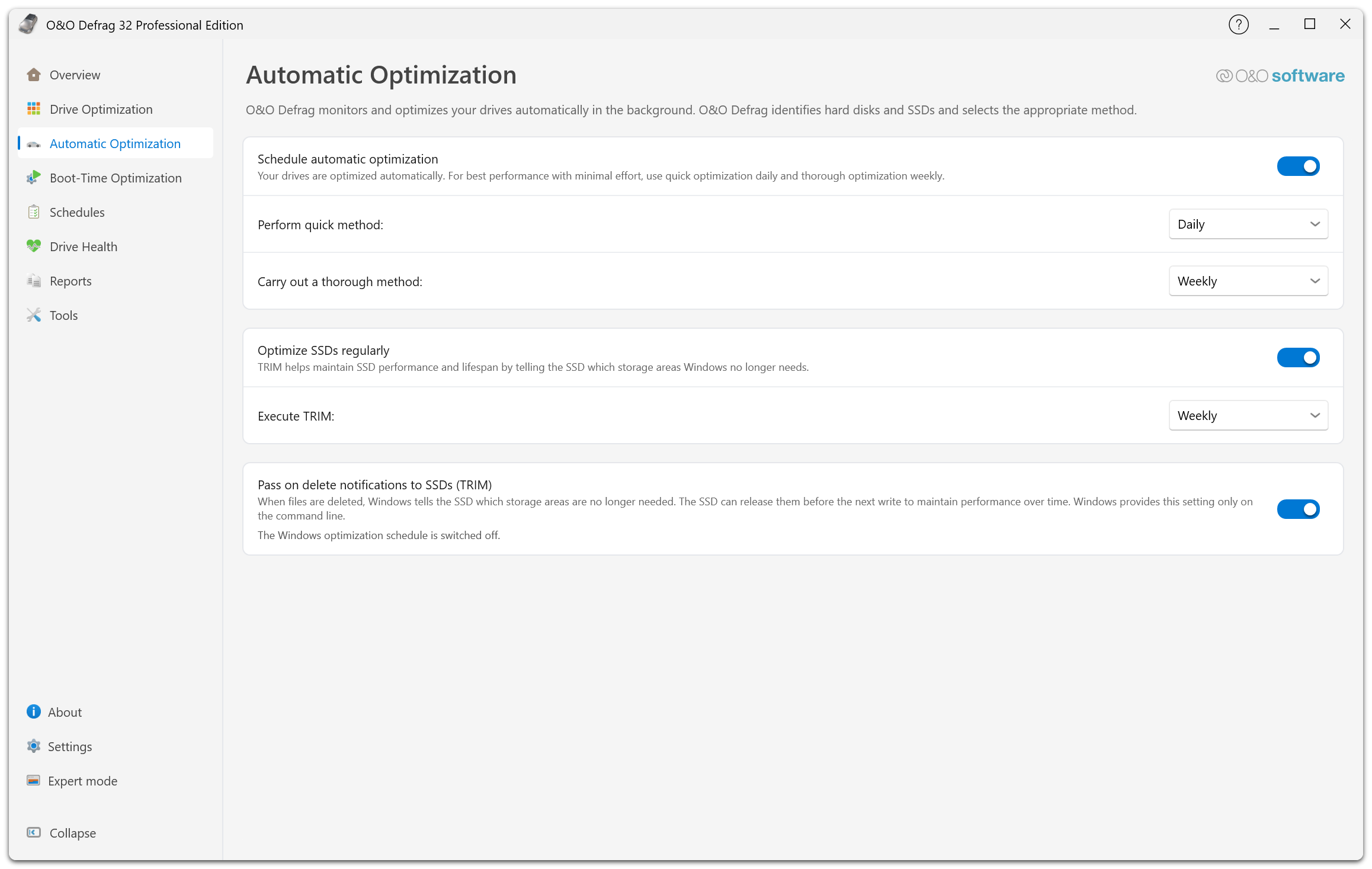
The first group switches background maintenance on and sets the intervals for the quick and the thorough method. The second group covers SSD maintenance and the Execute TRIM interval. The third controls whether Windows passes delete notifications to SSDs, and reports the state of the Windows optimization schedule below it.
The page applies changes as you make them. Quick optimization daily and thorough optimization weekly are the pattern described by the interface. Adjust the intervals to suit your workload rather than assuming the shortest interval is best.
Available quick and thorough intervals include Do not execute, every 6 or 12 hours, every 1, 2, 3, or 5 days, weekly, and every 2 weeks.
Which method runs
The agent chooses the method for each drive:
| Drive | Quick method | Thorough method |
|---|---|---|
| HDD | STEALTH | SPACE |
| HDD with zones enabled | OPTIMIZE/Quick | OPTIMIZE |
| SSD | SOLID | SOLID |
On an SSD, both intervals run the same method: SOLID, which reports and OODCMD call SOLID/Quick. Automatic optimization never starts SOLID/Complete on an SSD. Its additional passes move far more data, which would add wear on every scheduled run. A report that shows SOLID/Quick for a thorough run on an SSD is therefore expected. To consolidate the free space of an SSD, start SOLID/Complete manually or in a job.
While a run is active, the action Automatic optimization (thorough) names the schedule that started the run, not the method.
SSD maintenance
Enable Optimize SSDs regularly and select an Execute TRIM interval. The separate Windows TRIM notification setting is explained in SSD optimization and TRIM.
Control the impact
Set application-wide load limits in Settings → Performance. The agent uses these to limit its own CPU and disk activity. Start guards and excluded processes can prevent work while another important application is active.
Automatic optimization is performed by the background service. Closing the main window does not disable the schedule.
Disable or change maintenance
Turn off automatic optimization on this page, or review Disable automatic optimization in Settings → Optimization. Review SSD TRIM independently and inspect existing jobs: background intervals and explicit scheduled jobs are separate configurations.
To adjust per-volume maintenance options inside a job, use Drives → Automatic optimization… in the job editor. That editor also exposes additional maintenance intervals supported by the job configuration; see Job options.
Settings unavailable
If the page says it is waiting for agent settings, let the connection finish. If it reports an outdated service, update the installation. Disabled controls are not proof that automatic maintenance is off; the application may only lack a readable current configuration.