Command prompt
O&O DiskImage also has a command line version available. You can use it from the Windows command prompt (cmd). The O&O DiskImage command line makes it possible to manage disks, partitions/volumes, and images by use of commands.
Please start the command prompt (Tools -> Command prompt). The graphical user interface of O&O DiskImage will not be shown during a start from the command line. First, navigate in the command line (cmd) to the installation folder of O&O DiskImage. You will then be able to use the parameters listed in the chart.\
Example:
C:\Program Files\OO Software\DiskImage>oodicmdc.exe /create image /source S: /destination E:\Sample.org
Please note that when entering the parameter in the command line, no manual line break may be included in the command sequence. Otherwise, the command will not be executed as intended. The line breaks in the examples are caused by the document’s formatting.
Structure of a command
"Command" |Subcommand| "Parameter"
Example: /Help /?
Example:
Creating an image of Drive "S".
oodicmdc.exe /create image /source S: /destination E:\Sample.omg
Validating the image "E:Sample.omg".
oodicmdc.exe /validate /source E:Sample.omg
Restoring the image of drive “S“ onto drive "T". All data on drive "T" can be overwritten/deleted.
oodicmdc.exe /restore image /image E:\Sample.omg /source S: /destination T: /OverwriteTargetData
The command line interpreter from O&O DiskImage can process the following commands and parameters:
Values can be additionally defined by the use of " and '.
Example:
/format "O&O DiskImage"
The command line interpreter from O&O DiskImage can process the following commands and parameters:
| Command | Explanation |
|---|---|
| /create image /source "Parameter" Parameter: Drive letter x: Parameter: VolumeGuid {xxxx-xxxx-xxxx-xxxx} Parameter: DiskNo X Parameter: Offset@DiskNo X@Y /destination "Parameter" (optional) /password "Parameter" (force dismount) (optional) /comment "Parameter" (optional) /exclude "Parameter" (optional) /type "Parameter" (optional) /max "Parameter" (optional) /format (optional) /VirtualDiskType (optional) | Creation of a sector-based image. Source selection: Drive letter, e.g. D: Volume Guid, e.g. {xxxx-xxxx-xxxx-xxxx} Disc number, e.g. 0 Offset of the volume on the disk, e.g. 1048576@1 backup path/backup name Automatic encryption Comment File name including path and/or wildcards Type of backup "used sector" or "forensic" are possible, default used sector Maximum size of the target file in MB Format of the backup file: "O&O DiskImage", "VHD Format" or "VHDX Format", standard "O&O DiskImage". Example: /format "O&O DiskImage" Type of the corresponding format: "dynamic hard disk" or "fixed hard disk", default "dynamic hard disk" Example: /VirtualDiskType "dynamic hard disk" |
| /create image increment | Creation of an incremental sector-based image |
| /restore image /image "Parameter" Parameter: Drive letter x: Parameter: DiskNo X Parameter: Offset@DiskNo X@Y /source "Parameter" /destination "Parameter" (optional) Parameter: Drive letter x: Parameter: VolumeGuid {xxxx-xxxx-xxxx-xxxx} Parameter: DiskNo X Parameter: Offset@DiskNo X@Y /DecryptPassword "Parameter" (optional) /FillEmptyBlocksNull (optional) /WriteHarddiskDrive (optional) /CreateVolumeLikeSource (optional) /IgnoreReadErrors (optional) /SetBootPartitionBootable (optional) /ClearTargetDrive (optional) /OverwriteTargetData (optional) /IgnoreDataModification (optional) | Restoration of a sector-based image Path and name of the backup file Source selection, objects from the backup file: Drive letter, e.g. D: Disc number, e.g. 0 Offset of the volume on the disk, e.g. 1048576@1 target selection Drive letter, e.g. D: Volume Guid, e.g. {xxxx-xxxx-xxxx-xxxx} Disc number, e.g. 0 Offset of the volume on the disk, e.g. 1048576@1 Password for an encrypted backup Fill unused sectors with '0' bytes Do not open the device via the volume but via the data medium Create the target volume like the source volume without asking Ignore read errors without asking Mark a bootable partition as bootable without asking Delete the layout on the target without asking Overwrite data on the target without asking Report data modifications but do not cancel |
| /convert image /image "Parameter" /source "Parameter" /DecryptPassword "Parameter" /destination "Parameter" /destinationPassword "Parameter" /comment "Parameter" (optinal) /max "Parameter" (optinal) /format (optional) /VirtualDiskType (optional) | Conversion of a sector-based image Imaging path/image name Drive letter x: or DiskNo # For an encrypted image imaging path/image name Automatic encryption Comment Maximum size of the target file in Mbytes Format of the image file: "O&O DiskImage", "VHD Format" or "VHDX Format", default "O&O DiskImage". Example: /format "O&O DiskImage" Type of the according formats: "dynamic hard disk" or "fixed hard disk", default "dynamic hard disk" Example: /VirtualDiskType "dynamic hard disk" |
| /create backup /source "Parameter" /destination "Parameter" /password "Parameter" (optinal) /dismount (force dismount) (optinal) /comment "Parameter" (optinal) /exclude "Parameter" (optinal) /max "Parameter" (optinal) /IgnoreReadErrors (optinal) | Creation of a file-based image File name including path and/or wildcards Imaging path/image name Automatic encryption Log off for protection from data modification, default vss or snapshot Comment File name including path and/or wildcards Maximum size of the target file in Mbytes Ignore read errors without inquiry |
| /restore backup /source "Parameter" /destination "Parameter" /DecryptPassword "Parameter" /IgnoreReadErrors (optional) /OverwriteTargetData (optional) /IgnoreDataModification (optional) | Restoration of a file-based image Imaging path/image name Complete path For an encrypted image Ignore read errors without inquiry Overwrite data on the target without inquiry Report data modifications but don’t stop |
| /validate /source "Parameter" /DecryptPassword "Parameter" /AllSplits (optional) | Validation of a sector-based or file-based image Imaging path/image name For an encrypted image Take all splits into consideration for split image files |
| /mount image /source "Parameter" /image "Parameter" /DecryptPassword "Parameter" /driveletter "Parameter" | Mounting a sector-based image as a virtual disk Drive letter x: or DiskNo # Imaging path/image name For an encrypted image Drive letter x: |
| /unmount image /source "Parameter" | Unmounting a sector-based image Drive letter x: or DiskNo # |
| /duplicate /source "Parameter" Parameter: Drive letter x: Parameter: VolumeGuid {xxxx-xxxx-xxxx-xxxx} Parameter: DiskNo X Parameter: Offset@DiskNo X@Y /dismount (force dismount) (optional) /exclude "Parameter" (optional) /type "Parameter" (optional) /destination "Parameter" Parameter: Drive letter x: Parameter: VolumeGuid {xxxx-xxxx-xxxx-xxxx} Parameter: DiskNo X Parameter: Offset@DiskNo X@Y /FillEmptyBlocksNull (optional) /WriteHarddiskDrive (optional) /CreateVolumeLikeSource (optional) /IgnoreReadErrors (optional) /SetBootPartitionBootable (optional) /ClearTargetDrive (optional) /OverwriteTargetData (optional) | Duplicating a drive or a disk Duplicate a drive or disk Source selection: Drive letter, e.g. D: Volume Guid, e.g. {xxxx-xxxx-xxxx-xxxx} Disc number, e.g. 0 Offset of the volume on the disk, e.g. 1048576@1 Log out to protect against data modification, default vss or snapshot File name including path and/or wildcards used sector or forensic, default used sector Target selection: Drive letter, e.g. E: Volume Guid, e.g. {xxxx-xxxx-xxxx-xxxx} Disc number, e.g. 1 Offset of the volume on the disk, e.g. 1048576@1 Fill unused sectors with '0' bytes Do not open the device via the volume but via the data medium Create the target volume like the source volume without asking Ignore read errors without asking Mark a bootable partition as bootable without asking Delete the layout on the target without asking Overwrite data on the target without asking |
| /add license /name "Parameter" /company "Parameter" /serial "Parameter" | Product registration Your name Your company The serial number |
| /stop | End all running actions |
| /creating bootable medium /recovery environment (optional) /ADK (optional) /AIK (optional) /installation media (optional) /boot device (optional) /ISO path (optional) | Creating a bootable medium Windows® Restoration environment Windows® Assessment and Deployment Kit (ADK) Windows® Automated Installation Kit (AIK) Windows® Installation media CD/DVD burner or USB stick Memory path of the ISO file |
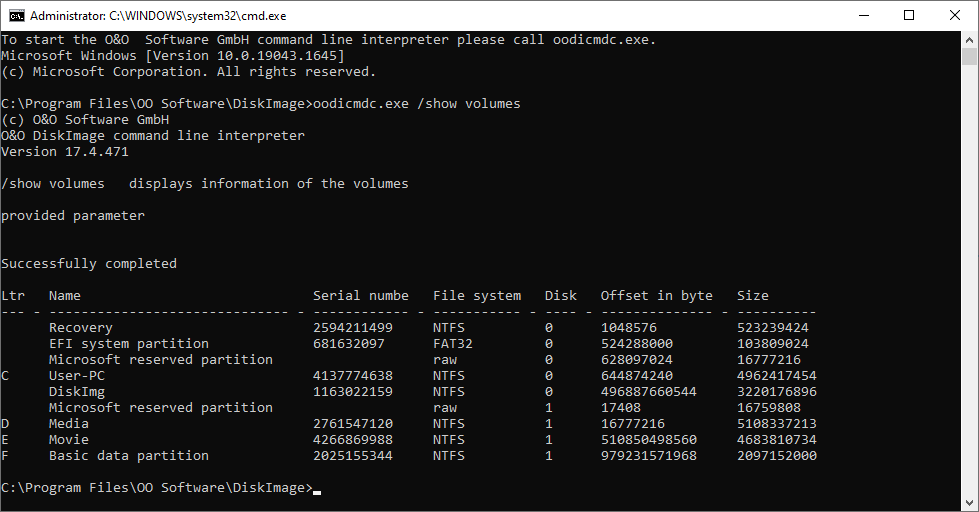
| /show volumes /image "Parameter" | Displays the drives. Path and name of the backup file, if no other parameter is specified, the system volumes are displayed. |
With the help of "/show volumes" a lot of information about the volumes can be displayed, including the drive letter, the disk number and the offset in bytes.