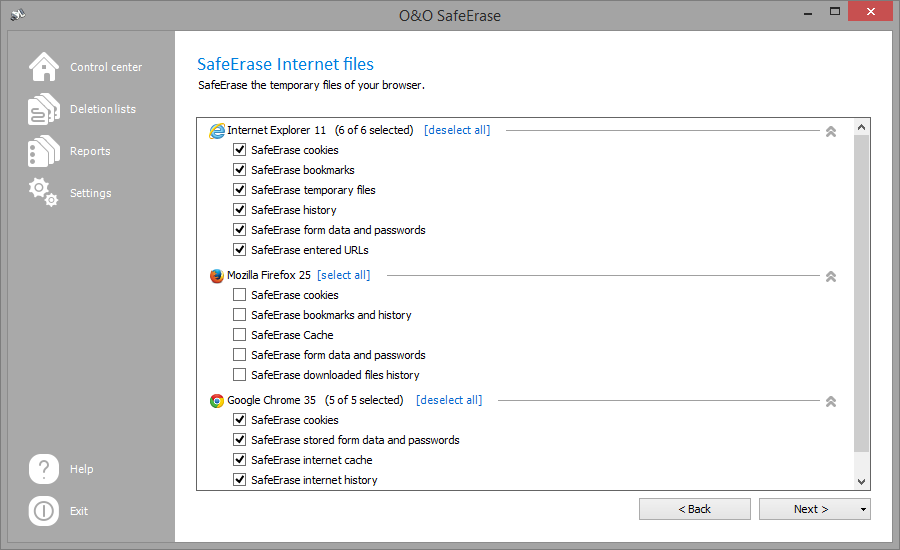
Delete temporary Internet files
Temporary Internet files are automatically created by your browser, whenever you use it. It is therefore retroactively traceable, which Internet pages have been visited by you. Sometimes, even login data is saved on your computer. If you want to SafeErase these temporary data, proceed as follows:
You can find the list of the supported Browser types in the System requirements.
- On the O&O SafeErase start page, click on SafeErase temporary Internet files.
- All Browser, which are installed on your computer are listed.
- Ac"SafeErase temporary Internet files"tivate the checks for the desired options.
- By clicking on Next you will get to selection of the Deletion method.
- After selecting the deletion method you can start the deletion with SafeErase now. All listed files will be deleted irrevocably.
| SafeErase cookies | Permanently deletes files, which were stored on the computer by websites. |
|---|---|
| SafeErase favorites/ SafeErase bookmarks | Permanently deletes your list of favored Websites. |
| SafeErase temporary files | Permanently deletes copies of web pages, pictures and media files, which were saved to allow faster access. |
| SafeErase history | Permanently deletes the list of URLs that you visited. |
| SafeErase form data and passwords | Permanently deletes information, which you have entered in forms. |
| SafeErase entered URLs | Permanently deletes entered URLs in the address line. |
| SafeErase history of downloaded files | Deletes the temporary files that were saved in the browser list during downloads. |
Note
Mozilla FireFox® stores Bookmarks and History in a common database file. It cannot be guaranteed that individual entries will be permanently deleted. To delete this information, the entire database file needs to be SafeErased. If you use SafeErase Internet files, all your Bookmarks will be deleted. The same applies to the Clean function following an analysis when Scan for stored Internet files is enabled. If you use SafeErase bookmarks and history, all Bookmarks will be lost.