Delete Windows and program data
By clicking Windows and program data on the start page, you reach the place where you can select the Windows and program data for deletion.
The operating system often buffers files temporary to unburden the memory. Normally, these temporary files are automatically deleted after having been used. Yet, even those deleted temporary files can be restored. Even if you securely delete individual files, some of that information still exists as a temporary file - a restoration cannot be excluded. To make sure that these temporary files do not cause any damage we recommend removing them with O&O SafeErase.
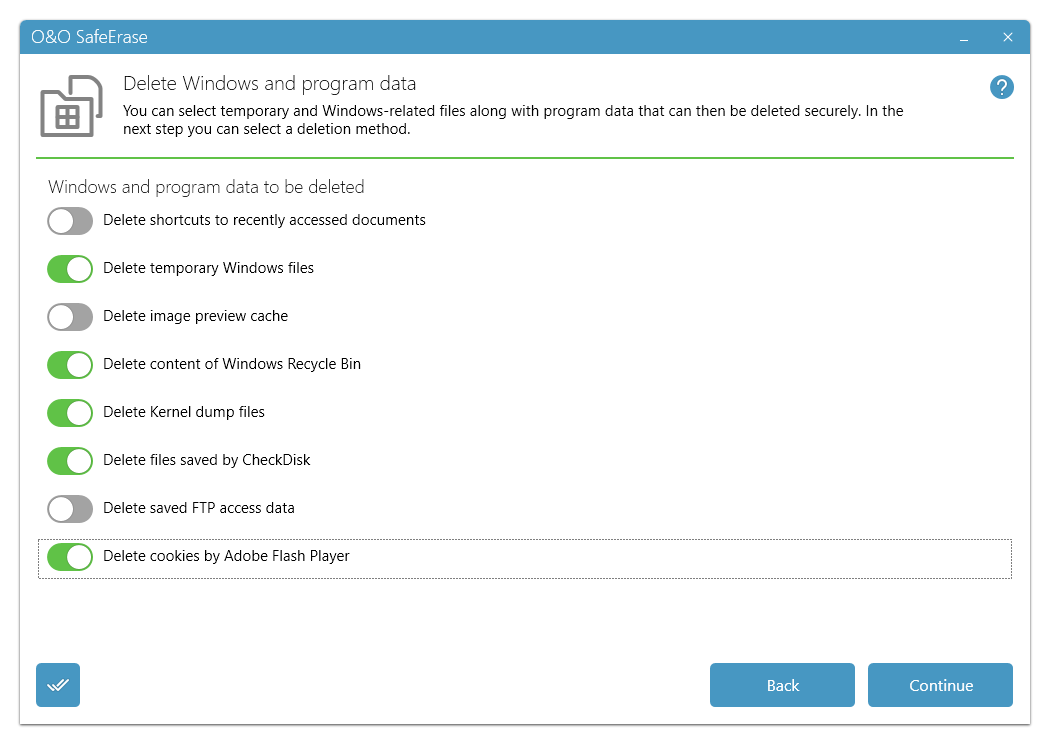
| Selection of the Windows files | Explanation |
|---|---|
| Shortcut to last accessed files | Permanently deletes the displayed shortcuts to files, which were just opened, e.g. the shortcuts displayed in the Windows start menu |
| Temporary Windows files | Windows sometimes stores temporary information in the folder TEMP. Normally, temporary information is deleted when Windows shuts down. You can permanently delete temporary files, which have not been modified for a week, without hesitation. |
| Image preview cache | Permanently deletes thumbnails - the preview of pictures from the cache. The cache enables the quicker preview of pictures, using the miniature view for example. |
| Content of the Windows Recycle Bin | Removes files from the Windows Recycle Bin. |
| Kernel memory dumps | Permanently deletes the copy of the storage content, which is saved in Windows in a file with the filename extension DMP, whenever Windows creates a storage statement for critical errors. |
| Stored data from CheckDisk | Permanently deletes files stored by CheckDisk due to system errors. |
| Stored FTP access data from Explorers | Removes the access data from FTP-Server stored in the Registry. (Path and password) |
| Adobe Flash Player Cookies | Permanently deletes the Cookie files from Adobe Flash Player. |