Start from the command line
O&O SafeErase also has a command line version available. You can use it from the Windows command prompt (cmd). This development lends itself nicely to the integration into scripts that then can then be automatically executed on command.
Parameters
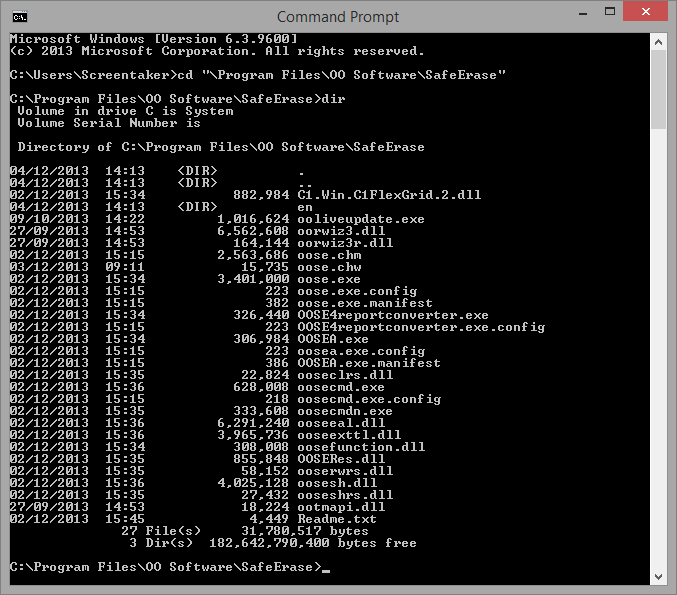
First, navigate in the command line (cmd) to the installation folder of O&O SafeErase. You will then be able to use the parameters listed in the chart.
The parameters in angle brackets </> are optional and do not have to be entered. A security prompt appears before deletion, which you can confirm automatically with the command /y .
Below you will find a description of the parameters for O&O SafeErase.
| Parameters | Explanation |
|---|---|
| [--showdisks] | Show disk drive information Example: Oosecmd.exe --showdisks |
| [--deletedrive <disk number>] | SafeErase diskThe O&O SafeErase Server and Workstation Editions allow you to delete multiple disks using one command. Example: Oosecmd.exe --deletedrive 1 Only in Workstation and Server Editions: Oosecmd.exe --deletedrive 1 deletedrive 2 |
| [--deletevolume <drive letter>] | SafeErase drive The O&O SafeErase Server and Workstation Editions allow you to delete multiple drives using one command. Example: Oosecmd.exe --deletevolume d: Only in Workstation and Server Editions: Oosecmd.exe --deletevolume d: deletevolume e: |
| [--freespace <Drive letter>] | SafeErase free space of a drive. The O&O SafeErase Server and Workstation Editions allow you to delete free space on multiple drives using one command. Example: Oosecmd.exe --freespace g: Only in Workstation and Server Editions: Oosecmd.exe --freespace g: freespace f: |
| [--analyse < internetfiles| windowsfiles| deletedfiles| all>] | Scan computer for potentially security relevant or unsafe deleted files. (Default: All file types are scanned and counted) internetfiles: Only temporary Internet files are scanned and counted. windowsfiles: Only temporary Windows files are scanned and counted. deletedfiles: Only unsafe deleted files will be scanned and counted. all: All three file types are scanned and counted. Example: Oosecmd.exe --analyze deletedfiles |
| [--autoclean <internetfiles| windowsfiles| deletedfiles| all>] | SafeErase files found by analysis. (Default: All found file types will be permanently deleted) Example: Oosecmd.exe --autoclean windowsfiles |
| [--internetfiles <cookies| favorites| temporary | history| formdata| typedurls| all>] | SafeErase temporary Internet files. (Default: All Internet files that are found will be deleted) cookies: deletes only cookies. favorites: deletes only set favorites. temporary: Deletes only temporary Internet files. history: Deletes only browsing history. formdata: Deletes only form data saved in the browser such as username/password. typedurls: Deletes only entered Internet addresses. all: Deletes all Internet files that are found Example: Oosecmd.exe --internetfiles cookies --internetfiles history |
| [--tempfiles <recent | temporary | thumbnails | recyclebin| memorydumps | checkdisk | ftp | all>] | Delete temporary Windows and program files (Default: All file types that are found will be SafeErased) recent: Permanently deletes temporary files from programs. temporary files: Deletes files in the Windows TEMP folder. thumbnails: Permanently deletes the picture preview from the cache. recyclebin: Deletes content from the Windows Recycle Bin. memorydumps: Deletes DMP files. checkdisk: Delets files that were saved by CheckDisk (CHK). ftp: Deletes saved login data from an FTP server. all: Deletes all temporary file types that are found. Example: Oosecmd.exe --tempfiles recyclebin |
| [--totalerase <internal | all>] | Deletes the entire computer. (Default: All internal drives will be deleted) internal: Only internal drives will be deleted. all: All connected drives, including external ones, will be deleted. Example: Oosecmd.exe --totalerase internal |
| [--security <highest| high| medium| low| lowest| zero>] | Optional: Set the used security level: highest: Highest security level high: High security level medium: Medium security level low: low security level lowest: Lowest security level zero: Overwrite with zeros Example: Oosecmd.exe --deletevolume d:\ --security zero |
| [--register <user:user name company:company Serial: Serial number>] | Register product Example: oosecmd.exe --register „user:max company:any company serial:xxx...“ Important: Please use quotation marks with the registration data, otherwise the registration will fail! |
| [--report name <file name>] | Specify path and name of the report. Example: Oosecmd.exe --reportname d:\test.html |
| [--createreport] or [-r] | A report is created for every activity performed by O&O SafeErase. Example: Oosecmd.exe --create report / Oosecmd.exe -r --report name d:\test.html |
| [--match <files| folders| all>] | Delete files and folders that match the file filter Example: oosecmd.exe –match files c:\test\*.* Deletes only files in folder c:\test |
| [-y] or [--yes] | Optional parameter: Answer all security prompts automatically with "Yes". Example: Oosecmd.exe --tempfiles all -y |
| [-s] or [--silent] | No display |
| [-v] or [--version] | Information on the program version Example: Oosecmd.exe --version |
| [-h] | Shows all available commands and their explanation. Example: Oosecmd.exe -h |
| <Files and/or folders> | List of files and folders to be permanently deleted. Example: oosecmd.exe c:\test\*.* c:\test2\pic.jpg d:\word\worddocument.doc |
Please note that when entering the parameter in the command line, no manual line break may be included in the command sequence. Otherwise, the command will not be executed as intended. The line breaks in the examples are caused by the document's formatting.
Combining several parameters
You can also build a command sequence from the parameter. You will be able to combine an activity, such as delete free space with as many different options you like, for example:
| Example | Explanation |
|---|---|
| Oosecmd.exe --freespace g: --security medium --createreport --reportname d:\test.html | The free space in drive G: will be SafeErased using the deletion method "medium security". Afterwards, a report on the deletion will be created and saved on Drive D: with the name test.html . |
| Oosecmd.exe --tempfiles all --security zero --createreport --reportname d:\test_1.html | All temporary Windows and program files will be overwritten with zeros. Afterwards, a report on the deletion will be created and saved on Drive D: with the name "test_1.html". |
| Oosecmd.exe c:\Application\CV.doc d:\Pictures\Passport_picture.jpg | The file "CV.doc" in the folder "Application" on Drive C:, the file "Passport_picture.jpg" in the folder "Pictures" on Drive D: will be SafeErased using the preset default method. |
Please bear in mind that while entering the parameter in the command line no manual line break will be included into the command sequence. Otherwise, the command cannot be executed as it is supposed to. The line breaks in the examples exists because of the document format.