Profiles Editor Premium
The Profiles Editor is an exclusive feature of the O&O ShutUp10 Premium Edition. It provides a full management interface for creating, organizing, and applying privacy setting profiles.
Overview
Profiles allow you to save a specific set of privacy settings and re-apply them at any time. The Profiles Editor (accessible from Profiles → Manage Profiles… in the main menu) lets you manage both built-in default profiles and your own custom profiles.
Built-in Default Profiles
The Profiles Editor includes several built-in default profiles that provide ready-made privacy configurations for common scenarios. These profiles are read-only and cannot be modified or deleted.
| Profile | Description |
|---|---|
| Recommended Settings | Enables all recommended privacy settings. Safe for most users with minimal impact on functionality. |
| Limited Settings | Enables all limited privacy settings. Enhanced privacy protection that may affect some Windows features. |
| Critical Settings | Enables all critical privacy settings. Maximum privacy protection that may significantly impact functionality. |
| Recommended + Limited Settings | Enables all recommended and limited privacy settings. Enhanced privacy protection that may affect some Windows features. |
| All Settings (Maximum Privacy) | Enables all privacy settings across recommended, limited, and critical categories. Maximum privacy protection that may significantly impact functionality. |
| Factory Reset | Resets all privacy settings to Windows factory defaults. Restores original system behavior. |
| Recommended settings by the BSI | Applies all settings recommended by the German Federal Office for Information Security (BSI) for disabling wireless technologies, telemetry, and related features in Windows 10/11. |
Built-in profiles marked as read-only cannot be renamed, edited, or deleted. They are maintained by the application and updated with new releases.
Creating Custom Profiles
Custom profiles are created using Edit Mode (see Edit Mode). The workflow is:
- Enable Edit Mode from the Edit menu.
- Toggle settings to configure your desired privacy state — changes are buffered and not applied immediately.
- Save as Profile from the Edit menu — the Save Custom Profile dialog opens.
- Enter a profile name (required) and an optional description/note.
- Click Create Profile to save.
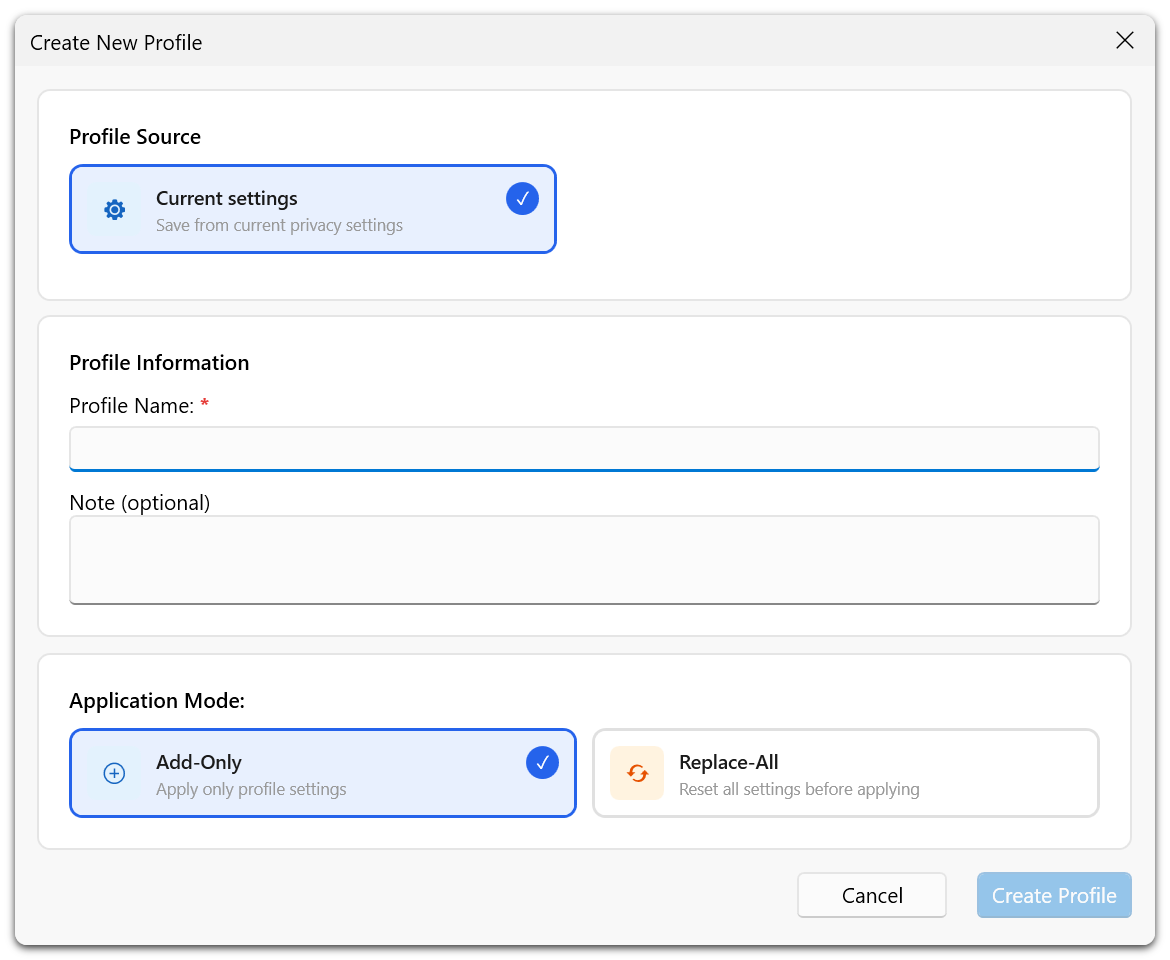
The profile stores all buffered setting changes. You can create multiple profiles for different scenarios (e.g., a strict profile for personal use and a balanced profile for a shared workstation).
Validation Rules
- A profile name is required. An empty name is not accepted.
- Duplicate profile names are not allowed.
- Profile names are limited to 64 characters and notes to 1,000 characters. Over-long names in imported profiles are shortened to the supported length.
- You must have at least one buffered change before saving.
Managing Profiles
The Manage Profiles dialog (accessible from Profiles → Manage Profiles…) provides a two-panel interface:
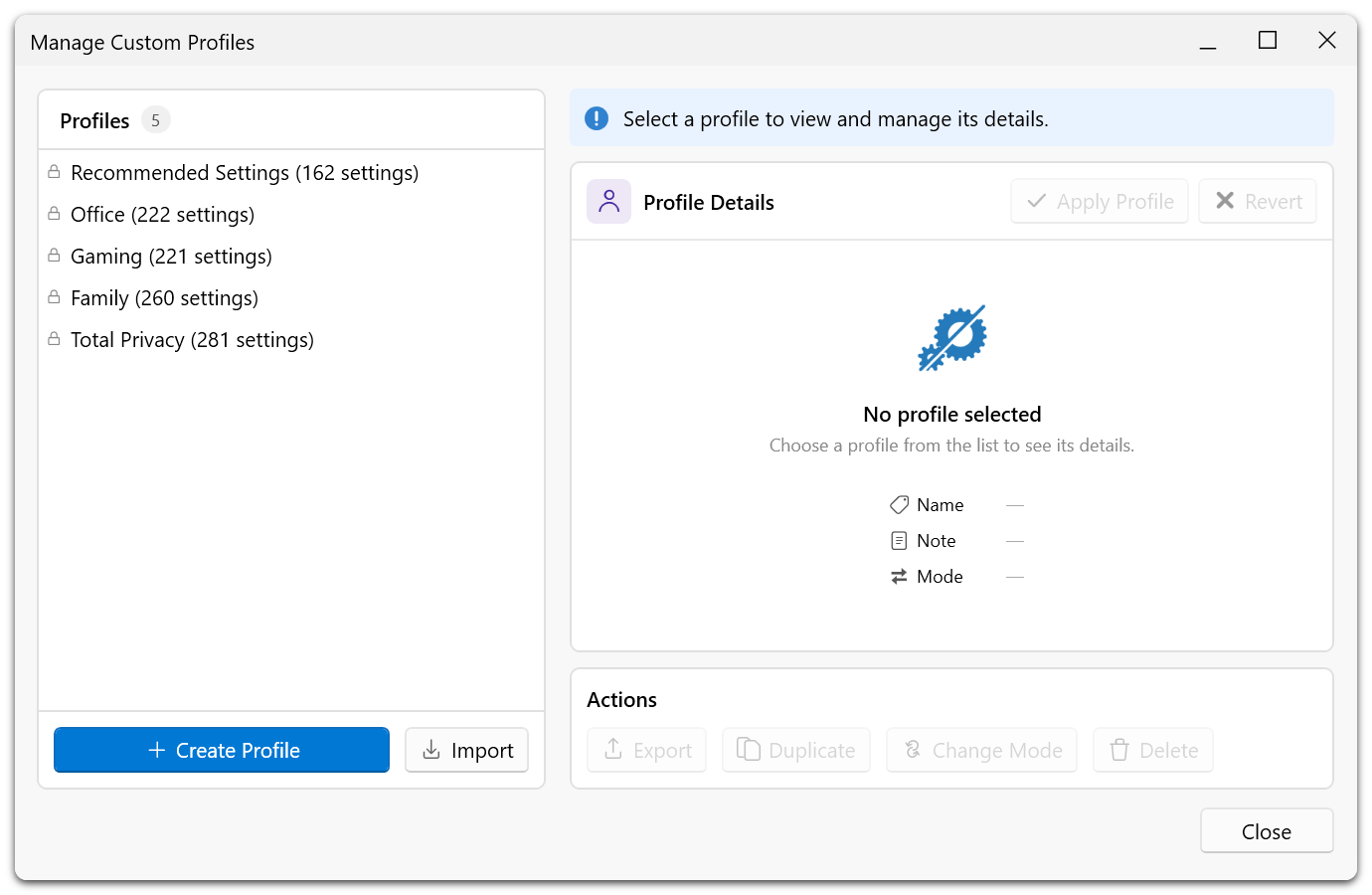
The dialog opens with a short explanation of what profiles are for, followed by a card showing the applied profile and how many of its settings are currently in force. The profile that is applied is preselected in the list when the dialog opens.
Left Panel — Profile List
Displays all available profiles (built-in and custom) with a profile count header. Select a profile to view its details.
Right Panel — Profile Details and Actions
Shows the selected profile's metadata:
- Profile name
- Creation date
- Number of settings included in the profile
- Note/description
Available actions for custom profiles:
| Action | Description |
|---|---|
| Apply Profile | Applies all settings from the selected profile to the system. |
| Rename | Change the profile name. |
| Edit Note | Modify the profile description. |
| Duplicate | Create an editable copy of the profile — the usual way to base a custom profile on a built-in one. |
| Change application mode | Switch between adding the profile's settings to the current state and replacing the current state entirely. See Profile File Structure. |
| Export | Save the profile to a file for use on another system. |
| Delete | Permanently remove the custom profile. |
Create profile and Import profile sit at the bottom of the dialog, since they create a new entry rather than acting on the selected one.
Built-in default profiles support Apply Profile, Duplicate and Export. Rename, Edit Note and Delete are not available for them.
When Apply is Unavailable
Apply Profile is only enabled when applying the selected profile would actually change something. If the system already matches the profile, the button stays disabled — this avoids an apply that reports "0 settings changed" and reads like a failure. Settings that cannot be changed on this system — because they are held by a global configuration file, or require rights you do not have — are not counted as pending, so the button does not stay enabled on a locked-down machine.
Applying a Profile
When you apply a profile, all privacy settings contained in that profile are applied to the system. For built-in profiles, settings are applied according to their recommendation level. For custom profiles, the exact setting states captured when the profile was created are restored.
Before applying a profile that changes many settings, consider creating a system restore point from the Actions menu. Applying a profile is also recorded in the Undo History, so it can be taken back from Actions → Undo afterwards.